

AI Can Bring Many Benefits to Your Business… But There’s Hidden Risks Involved.
AI tools are quickly becoming part of everyday work.
Employees use them to summarize documents, draft emails, analyze information, brainstorm ideas, and speed up repetitive tasks. The productivity benefits are real.
But there’s a growing security problem that many businesses haven’t fully accounted for yet: Shadow AI.
Shadow AI happens when employees use AI tools, browser extensions, personal accounts, or connected apps that haven’t been approved or managed by the company’s IT team.
The issue isn’t necessarily the AI itself. It’s what the tool can access, what employees share with it, and where that information goes once it leaves your environment.
What Does Shadow AI Look Like?
It can be surprisingly ordinary.
An employee installs a browser extension that promises to summarize webpages. Someone uploads a company spreadsheet to a personal AI account. A new AI assistant is connected to email, files, or browser tabs without IT knowing about it.
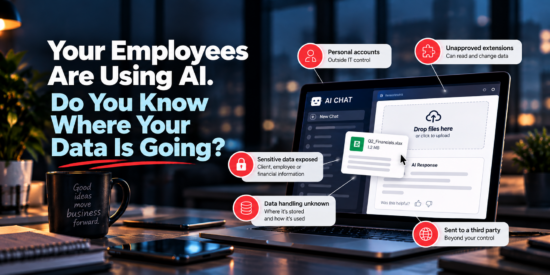
The advisory highlights several common warning signs: personal accounts, unapproved extensions, tools that can read or change data, sensitive information being exposed, unknown data-handling practices, and AI operating outside IT control.
None of those actions may feel particularly risky in the moment.
Together, though, they can create a serious visibility problem.
The Real Risk Is the Data
Imagine an employee wants help analyzing a financial document.
They upload the file to an unapproved AI tool. The file contains confidential company information. That data is now being processed by a third party, and your business may not know how long it is retained, where it is stored, or what permissions were granted along the way.
That exact type of scenario is illustrated in the advisory: an unapproved AI tool, a company file, sensitive information, third-party exposure, and unknown data retention.
The employee may simply be trying to work faster.
But without guardrails, convenience can create risk.
How Businesses Can Use AI More Safely
The answer isn’t to ban AI.
It’s to give employees clear rules for using it safely.
The advisory recommends a few straightforward practices:
- Use only AI tools approved by your company or IT provider.
- Keep work activity inside company-managed accounts and services.
- Don’t paste or upload client, employee, financial, or confidential information into unapproved tools.
- Review what permissions AI tools have to browser tabs, files, email, and connected apps.
- Report mistakes or unapproved AI use quickly so IT can determine what was accessed or shared.
These controls allow businesses to take advantage of AI without giving up visibility over their own data.
Bring AI Out of the Shadows
Employees are going to keep experimenting with AI.
The safest approach is to make sure that experimentation happens within clear boundaries.
That means knowing which tools are being used, which accounts employees are using, what information is being shared, and what those tools can access.
If your organization doesn’t have an AI usage policy yet, Cybersecurity Awareness Month is a good time to start the conversation.
Not sure what AI tools are being used across your business? We can help review your environment and put the right guardrails in place.