

Meta Released Muse, a Personal AI Assistant – And Your Employees Are Probably Already Using It
In September, Meta released Muse, a personal AI assistant that can send emails, book travel and make payments on a person’s behalf. It caught on fast, with 2.8 million downloads in the US and Canada in its first 12 days.
There’s a good chance someone on your team has already tried Muse, or a tool like it, at home. That matters for your organization, because these assistants work best when they’re connected to email and calendars, and for many people that includes their work accounts.
From Answering Questions to Taking Action
Most people’s first experience with AI was a chatbot. You ask a question and it gives you an answer. The new wave of personal assistants, often called AI agents, goes a step further. They act on your behalf.
- Meta Muse connects to a person’s apps for email, calendar, payments, shopping and smart home devices. People message it through its own app or through WhatsApp.
- OpenClaw is a free, open-source assistant that runs on a person’s own computer and works through chat apps like WhatsApp and Discord. It’s popular with tech-savvy users, and Muse was modeled on it.
That ability to act is what makes these tools useful, and it’s also what raises the stakes. Gartner analysts described OpenClaw’s security risks as unacceptable, noting it is insecure by default. Even Meta’s own employees, while testing Muse before launch, reported cases where it uploaded sensitive information without permission.
Where This Touches Your Organization
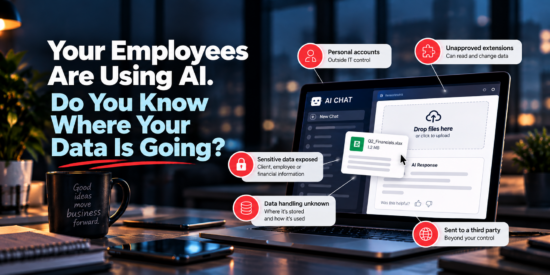
You may never roll out an AI assistant officially. Your staff can still bring one into your environment without anyone noticing. Here’s how that usually happens:
- Work accounts get connected to personal tools. An employee links their work mailbox to a personal assistant to help with scheduling. That outside tool can now read, and sometimes send, organizational email.
- Tools run outside IT’s view. Security researchers point out that OpenClaw can reach work applications even when it runs on a personal computer at home, using the credentials an employee is already signed in with.
- Instructions can be hidden in everyday content. An email, document or web page can contain text written for the AI rather than the person. An assistant that follows it might forward a file or reply to someone it shouldn’t.
- Sensitive data is hard to take back. Once donor lists, member records, client files or financial details pass through a third-party tool, you lose control over where they’re stored and who can see them.
Five Practical Steps to Take Now
Banning AI outright rarely works, and your team will find good uses for it. The goal is to make safe use the easy default.
- Put a short AI use policy in writing. List which tools are approved for work and which types of data should never be entered into any AI tool.
- Keep work accounts out of personal assistants. Make it clear that work email, calendars and file storage should only connect to tools your organization has approved.
- Require approval for new app connections. Microsoft 365 lets administrators require sign-off before a third-party app can access mailboxes, calendars or files.
- Review what’s already connected. Check which outside apps already have access to your Microsoft 365 or Google Workspace accounts, and remove anything that isn’t needed.
- Talk with your team. A quick conversation about how these assistants work, and what they can access, goes a long way. Most people simply haven’t thought about it yet.
Join Us November 11: One Employee, One Prompt, Your Biggest Data Leak
We’re covering this topic in depth in our free webinar on November 11. We’ll walk through how everyday AI use can expose sensitive data, what to look for in your own environment, and simple policies and settings that protect your organization without slowing your team down.
Can’t make it? Our team is happy to review your AI policies and Microsoft 365 settings with you. Just reach out to schedule a conversation.